

Some agents drown in tickets while others sit idle. Meanwhile, urgent issues wait in a queue no one is watching.
This is a workload problem, not an effort problem. Even great agents struggle when work is spread unevenly.
Poor workload management leads to missed SLAs, slow replies, and burnout. Over half of service agents report burnout, according to Salesforce’s 2025 data.
This guide explains what support workload management is, why it matters, and how to balance work across your team. It links to detailed guides on each part.
Support workload management is how you distribute and balance work across your team. The goal is steady, fair, and sustainable output.
It covers how tickets arrive, how they are prioritized, and who handles them. It also covers how you plan capacity for busy periods.
Done well, it keeps queues moving and agents productive without overload.
Uneven workload has real costs. It hurts customers, agents, and the business at once.
When some queues pile up, response times slip. Customers feel the delay even if the team is busy overall.
Overloaded agents make more mistakes and leave sooner. In customer service, 77% say their workload and issue complexity have risen year over year.
Support turnover already runs high, so overload is expensive to ignore.
Work that sits unassigned breaches SLAs quietly. Real-time visibility is needed to catch risk early.
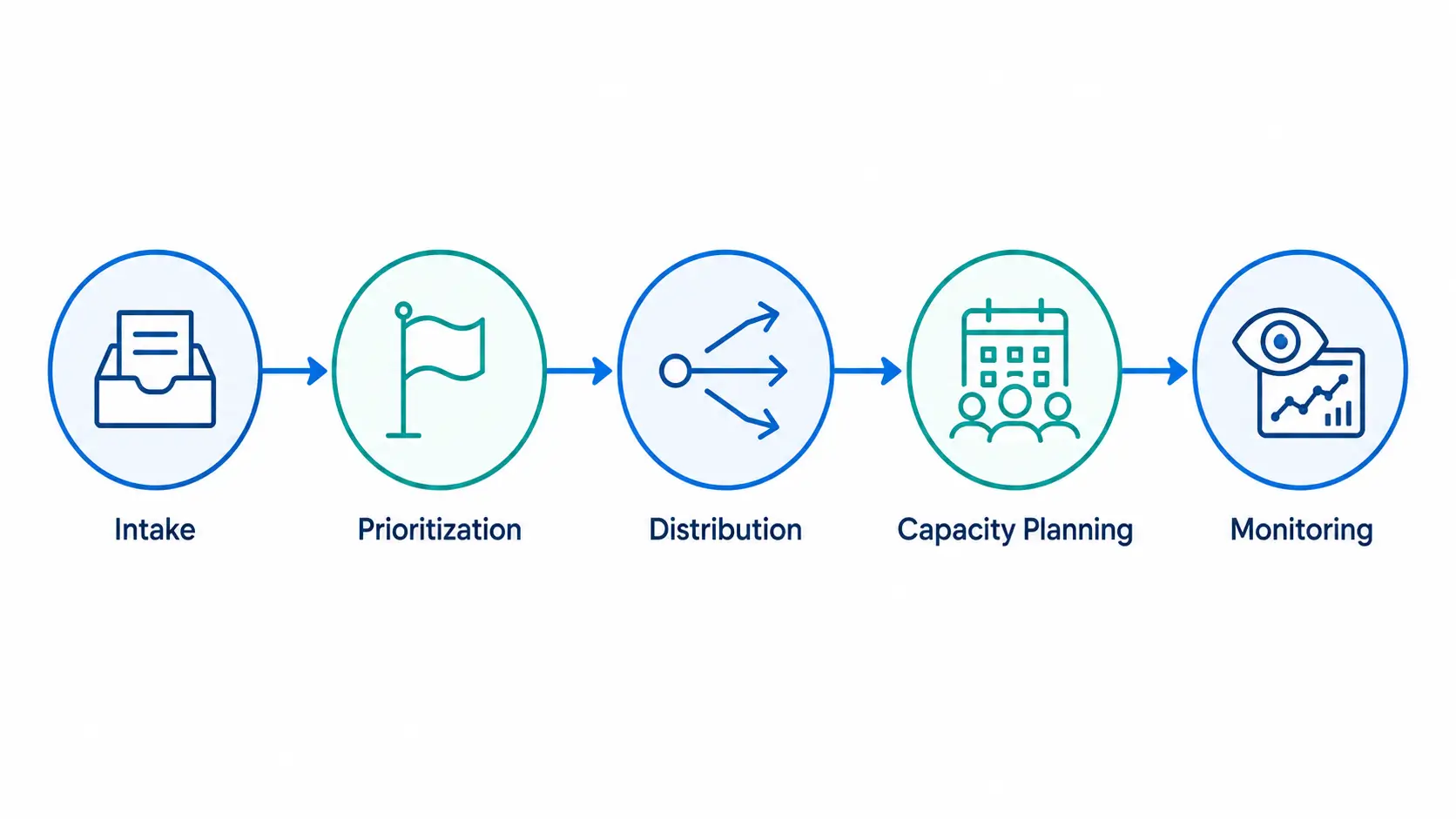
Workload management has five moving parts. Weakness in any one creates bottlenecks.
The rest of this guide looks at each part and how to improve it.
Distribution is where most teams win or lose. The method you choose shapes fairness and speed.
| Method | How it works | Best for |
|---|---|---|
| Manual assignment | A lead assigns each ticket by hand | Very small teams, low volume |
| Round robin | Tickets rotate evenly across agents | Simple, even distribution |
| Skills-based | Tickets route to agents by expertise | Specialized or tiered support |
| Load-based / AI | Tickets route by current workload and skills | Growing teams, higher volume |
Manual assignment
Round robin
Skills-based
Load-based / AI
Manual assignment does not scale. As volume grows, automated routing keeps work balanced without a person in the middle.
AI routing can weigh skills, workload, and priority together. This prevents both overload and idle time. AI ticket routing guide
Capacity planning answers one question: do you have enough agents for the work? It uses past data to forecast future demand.
Start by tracking ticket volume by day and hour. Look for peaks tied to launches, seasons, or business cycles.
Then compare demand to your team’s realistic capacity. Plan coverage for peaks before they arrive.
You cannot manage what you cannot see. These metrics show whether workload is healthy.
| Metric | What it shows | Watch for |
|---|---|---|
| Agent utilization | Share of time spent on active work | Sustained highs signal overload |
| Backlog / queue age | Unresolved tickets and their age | Growing backlog means undercapacity |
| First response time | How fast the first reply goes out | Rising times signal bottlenecks |
| SLA compliance | Share of tickets meeting targets | Drops reveal distribution gaps |
Agent utilization
Backlog / queue age
First response time
SLA compliance
Track these together, not alone. High utilization with rising backlog means you need more capacity or better routing.
Manual workload management breaks down as teams grow. Automation keeps it steady at scale.
AI routing assigns tickets by skill, priority, and current load. It reacts in real time as queues change.
Real-time dashboards flag SLA risk and backlog before they become failures. Analytics reveal patterns to plan around. analytics and reporting guide
These mistakes are common and fixable.
When queues overflow, the instinct is to hire. More people can help, but hiring is slow and costly.
Support turnover already runs high, and replacing an agent is expensive. Adding headcount to a broken process just spreads the same problems wider.
Often, better distribution and clearer priorities recover hidden capacity first. Fix the process, then hire against real, measured demand.
Capacity planning tells you when hiring is truly needed. That makes each new hire a deliberate choice, not a reaction to chaos.

Tools and rules matter, but culture keeps workload healthy over time. A few habits make the difference.
Share queue and backlog data with the team. When agents see the whole picture, they help balance work themselves.
Constant context switching drains agents. Group similar tickets and shield deep-focus work where possible.
When an agent falls behind, look at the workload first. Blaming people hides the real cause and speeds burnout.
A fair, visible system builds trust. Agents stay longer when the work feels manageable and evenly shared.
Hengine is an AI ticketing and help desk platform built to keep workload balanced.
AI routing assigns tickets by skill, priority, and load, so no agent is buried while others idle.
Real-time SLA tracking flags risk early, and analytics support capacity planning.
One workspace covers IT, HR, and customer requests, giving a full view of team load.
A few clear signals point to a workload problem. If several sound familiar, act now.
These signs usually mean distribution or capacity needs attention, not that agents lack effort.
Distribution only works when priority is clear. Without it, urgent issues get the same treatment as routine ones.
A simple approach ranks tickets by urgency and impact. Urgency is how fast it needs a reply; impact is how many people it affects.
Define a few priority levels, such as low, medium, high, and urgent. Tie each to a target response time.
Shared definitions keep decisions consistent across agents and shifts. SLA targets guide
Rules can set priority from keywords, channel, or customer tier. This removes guesswork and speeds triage.
Capacity planning does not need to be complex. A simple, repeatable process works for most teams.
Review the plan each quarter. Demand shifts as your product and customer base grow.
Change works best in small steps. Trying to fix everything at once overwhelms the team.
Small, steady improvements compound. Within a few cycles, queues feel calmer and fairer.
Workload management is not just an internal concern. It shows up directly in customer experience.
When work is balanced, tickets move through queues at a steady pace. First response and resolution times stay predictable.
Predictable response times make SLAs easier to meet. Consistent service, in turn, lifts customer satisfaction scores.
The reverse is also true. Uneven workload creates spikes in wait time that frustrate customers and pull down ratings.
So improving distribution and capacity is one of the most direct ways to protect both SLAs and CSAT. SLA management guide
It is how you distribute and balance tickets across your team. The aim is steady output without overloading anyone.
Use automated routing based on skills and current load. This spreads work evenly and adapts as queues change.
Watch agent utilization, backlog age, first response time, and SLA compliance together. Rising backlog with high utilization signals overload.
Even distribution prevents a few agents from carrying too much. Balanced load and clear priorities lower stress and turnover.
Automate once manual assignment slows you down or misses tickets. Most teams reach this point as volume grows.
Start by measuring utilization and backlog. Then improve distribution, plan for peaks, and watch SLA risk in real time.
To see balanced routing, real-time SLA tracking, and capacity insights in one place, explore how Hengine manages support workload.



