Every growing team reaches a point where email cannot keep up with support. Requests get lost, replies slip, and no one knows who owns what.
Help desk software fixes this. It turns scattered requests into organized, trackable tickets.
This guide explains what help desk software is, how it works, its core features, and how to choose the right tool. It links to deeper guides on each topic.
Help desk software is a tool for receiving, organizing, and resolving support requests. Each request becomes a ticket the team can track.
It gives support a single place to work. Requests from email, chat, and forms all land in one queue.
The result is faster replies, clear ownership, and no lost requests.
People use these terms loosely, and they overlap. The difference is scope.
A ticketing system is the engine that turns requests into tickets and tracks them. A help desk is the wider tool built around that engine.
Most modern help desk software includes a ticketing system plus reporting, automation, and self-service.
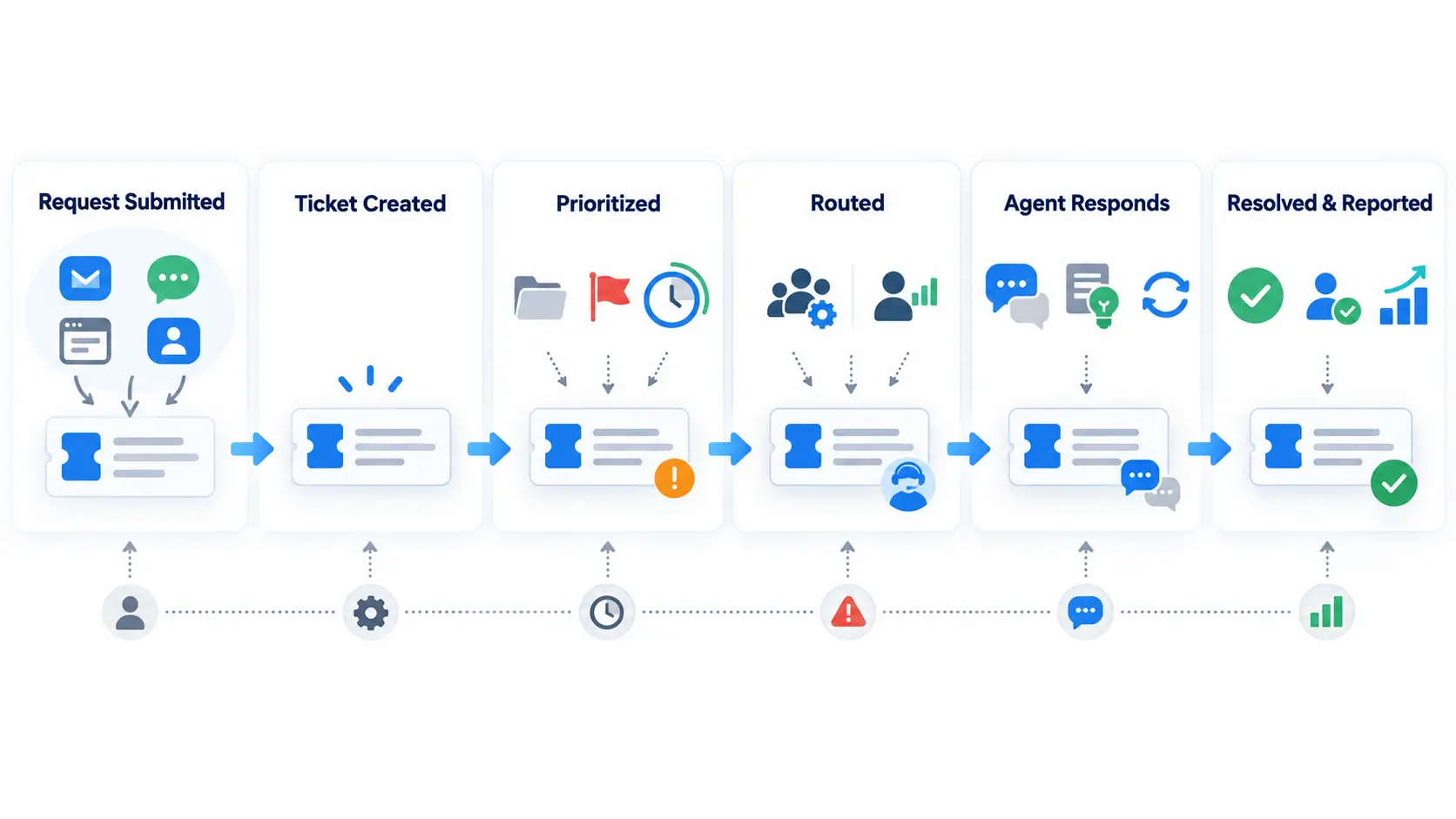
The flow is simple, even if the tool is powerful. Here is the basic path a request takes.
This lifecycle repeats for every request. Automation can handle routing and updates along the way.
Tools vary, but the essentials are consistent. Look for these when comparing options.
The right mix depends on your team. A small team needs less than a large operation.
Help desk tools come in a few forms. The best fit depends on who you support and how.
| Type | Who it serves | Example use |
|---|---|---|
| Customer support | External customers | Product and billing questions |
| IT help desk | Employees with IT issues | Password resets, hardware faults |
| Internal / shared services | HR, facilities, and more | Onboarding and office requests |
| Enterprise ITSM | Large IT operations | Incident, problem, and change |
Customer support
IT help desk
Internal / shared services
Enterprise ITSM
Some tools handle several of these at once. One workspace for IT, HR, and customer requests avoids separate systems.
The payoff shows up quickly for teams moving off email.
Every request becomes a tracked ticket. Clear ownership means requests do not fall through the cracks.
Routing and templates speed up responses. Customers get consistent answers, not ad hoc ones.
Reporting shows volume, response times, and backlog. Managers can spot problems early.
A good tool grows with you, from a few agents to many teams. scaling support guide
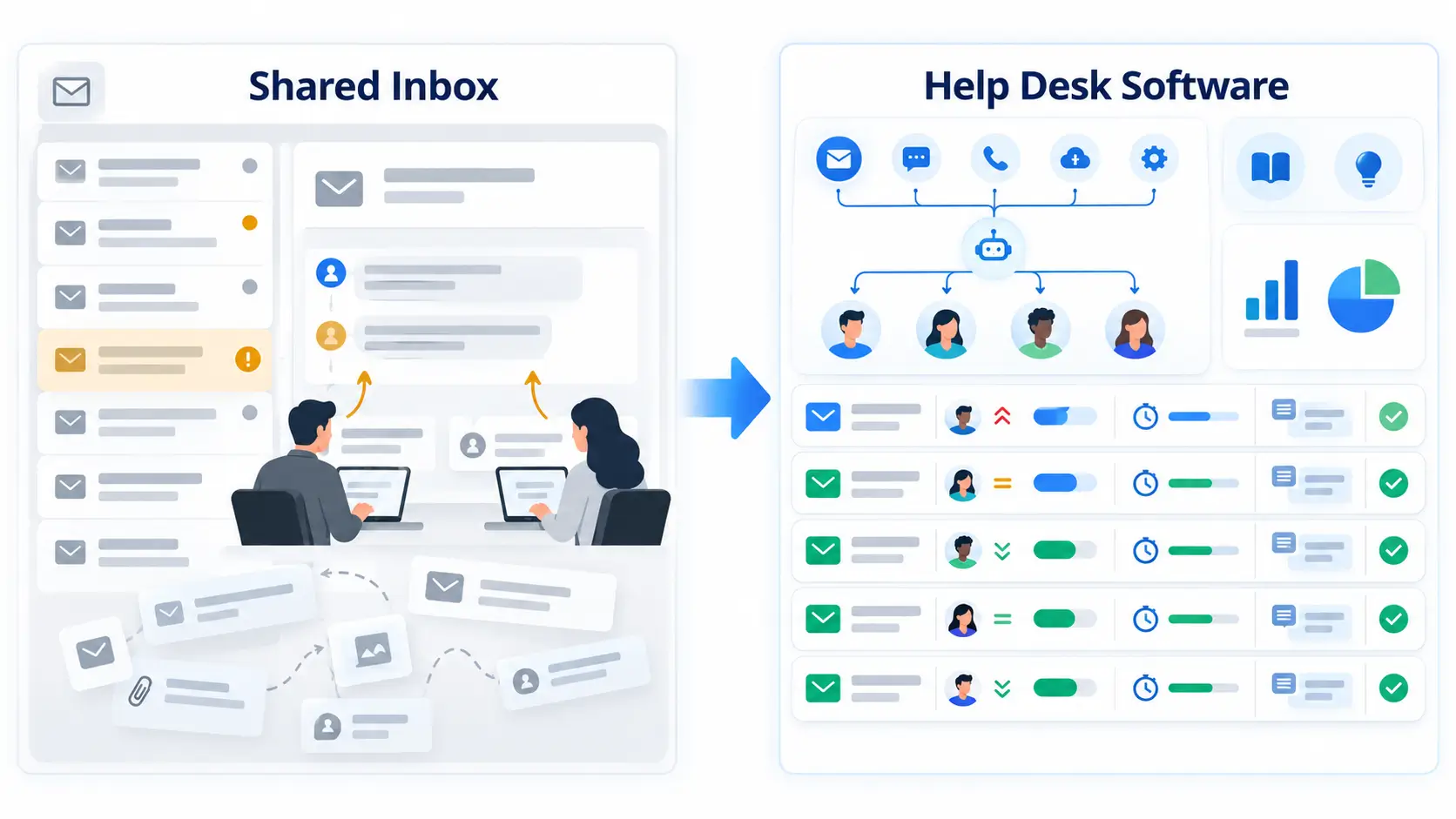
Many teams start with a shared email inbox. It works until volume grows, then the cracks show.
A shared inbox has no real ownership, no SLAs, and no reporting. Two agents can reply to the same email, or none can.
Help desk software adds structure: assignment, status, priority, and history on every request. That structure is what a growing team needs.
If your team argues over who replied to what, you have outgrown the shared inbox.
Help desk tools come as cloud or on-premise. Most teams now choose cloud.
Cloud tools are hosted by the vendor. They are faster to set up, update automatically, and need no servers.
On-premise tools run on your own infrastructure. They offer more control but require IT resources to maintain.
Unless you have strict data-residency rules, cloud is usually the simpler choice.
Adoption fails more often from process than from the tool. These mistakes are common and avoidable.
Start simple, configure the basics well, then expand. A well-used simple setup beats an unused complex one.
Match the tool to your needs, not the longest feature list. These criteria matter most.
Trial two tools with real tickets before deciding. A demo shows the tool at its best; a trial shows how it works for you.
The tool is only half the story. How you use it decides the results.
Set clear priorities and SLAs, route by skill, and keep a knowledge base current. Review metrics regularly and adjust.
Modern help desks do more than store tickets. Automation and AI now handle much of the routine work.
Rules can route tickets by skill and priority, tag them, and send canned replies. This frees agents for real problems.
AI takes this further. It can suggest replies, classify tickets, and balance workload across the team in real time. AI ticketing guide
You do not need every AI feature on day one. Start with basic automation, then add AI where it saves the most time.
Support is not only a customer function. The same tool can serve teams across the business.
IT uses it for incidents and requests. HR uses it for onboarding and employee questions. Facilities uses it for office issues.
Running these on one platform gives leaders a shared view of workload and service levels. It also cuts the cost of separate tools.
Hengine is an AI ticketing and help desk platform for teams that want power without complexity.
It includes ticket management, AI routing, real-time SLA tracking, and analytics in the core product.
One workspace covers IT, HR, and customer requests, and pricing stays simple as you grow.
Not sure it is time? A few clear signals mean the move will pay off.
If several of these apply, help desk software will save time within weeks.
It receives, organizes, and resolves support requests as tickets. This keeps replies fast and prevents lost requests.
A ticketing system tracks requests as tickets. A help desk is the broader tool built around it, adding reporting, automation, and self-service.
Once email becomes hard to manage, yes. Even small teams benefit from clear ownership and tracking.
Pricing is usually per agent per month, and varies widely by tier. Watch for extra fees on AI or higher plans.
Start with ticket management, multichannel intake, SLAs, and reporting. Add automation and self-service as you grow.
Decide who you support and which features you truly need. Then trial two tools with real tickets and compare.
To see ticket management, AI routing, and SLA tracking in one platform, explore how Hengine works.