
Support volume rarely shrinks. As a company grows, requests pile up faster than a team can sort, route, and answer them by hand.
An AI ticketing system is built for exactly that pressure. It uses automation and machine learning to read, organize, and route requests, so your team spends time resolving issues instead of managing a queue.
This guide explains what an AI ticketing system is and how it works. It then covers the must-have features, the benefits, and how to choose one, with links to deeper articles on each topic.
An AI ticketing system is a help desk tool that uses artificial intelligence to automate parts of the ticket lifecycle. It can categorize, prioritize, route, and even draft replies to incoming requests.
A traditional ticketing system simply stores and tracks requests. The AI layer adds judgment, reading each ticket and deciding what should happen next.
The goal is not to remove people from support. It is to handle the repetitive work automatically, so agents focus on the cases that genuinely need a human.
For a plain-English introduction aimed at beginners, see our explainer on what an AI ticketing system is.
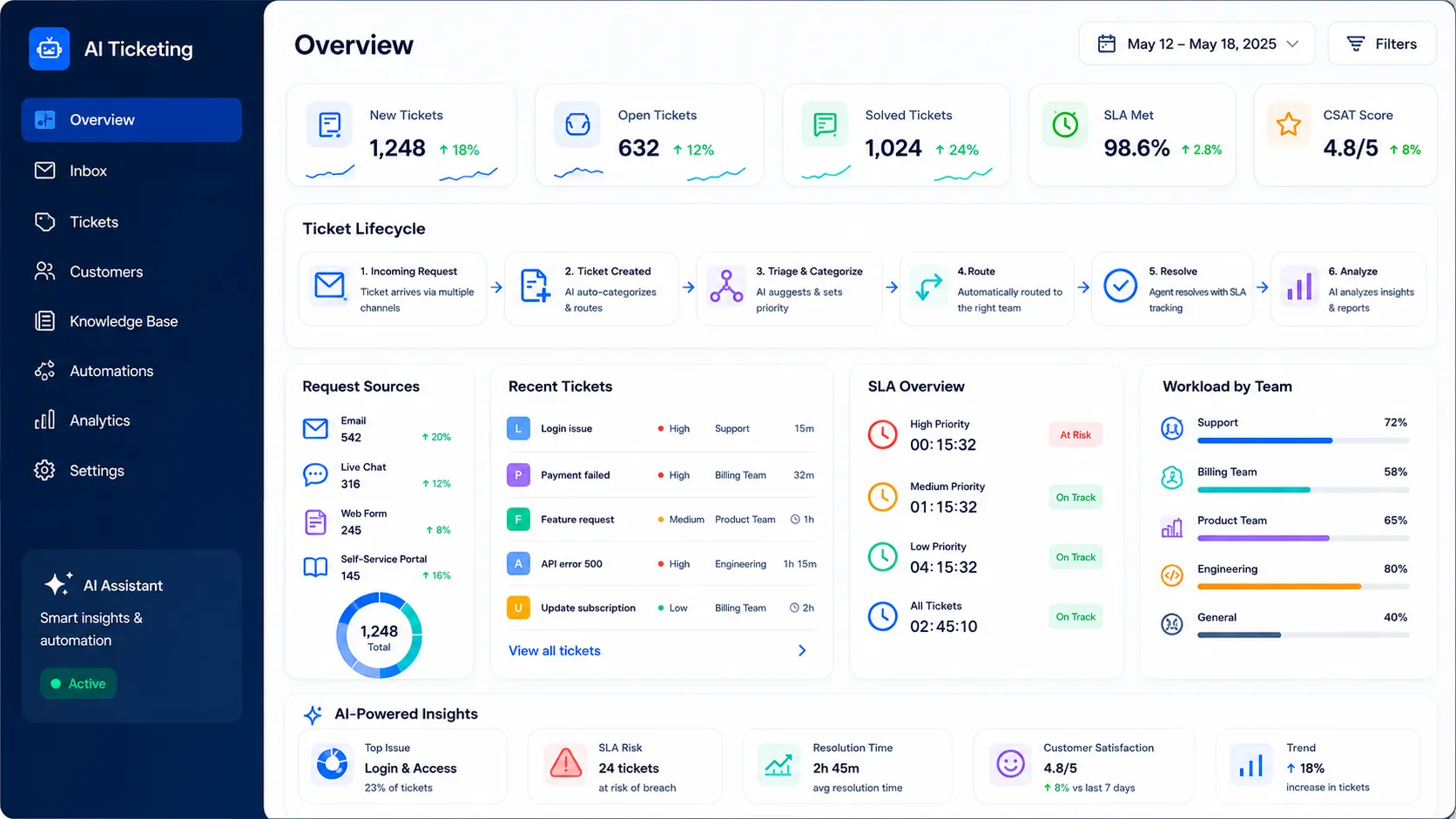
AI ticketing system dashboard showing request capture, triage, routing, SLA tracking, analytics, and automated support workflows.
The intelligence in an AI ticketing system follows a clear pipeline. Each incoming request moves through the same stages, in seconds.
A ticket arrives from email, a web form, a chat widget, or a self-service portal. The system creates a structured ticket and fills in the requester’s details automatically.
Natural language processing, or NLP, reads the message to grasp its meaning. It detects the topic, the intent, and often the sentiment behind the words.
The system tags the ticket by type and assigns a priority. A reported outage is flagged urgent, while a general question is queued at a lower level.
Based on the category and priority, the ticket is routed to the right team or agent. Machine learning improves these decisions by learning from how past tickets were handled.
The system can suggest a reply, surface a relevant knowledge base article, or summarize a long thread. The agent reviews, edits, and sends, staying in control of the final answer.
Every resolved ticket feeds the analytics. Over time, the system spots trends, flags risks, and helps managers improve the process.
Routing is where most teams feel the benefit first. For the full mechanics, read how AI ticket routing and auto-assignment works.
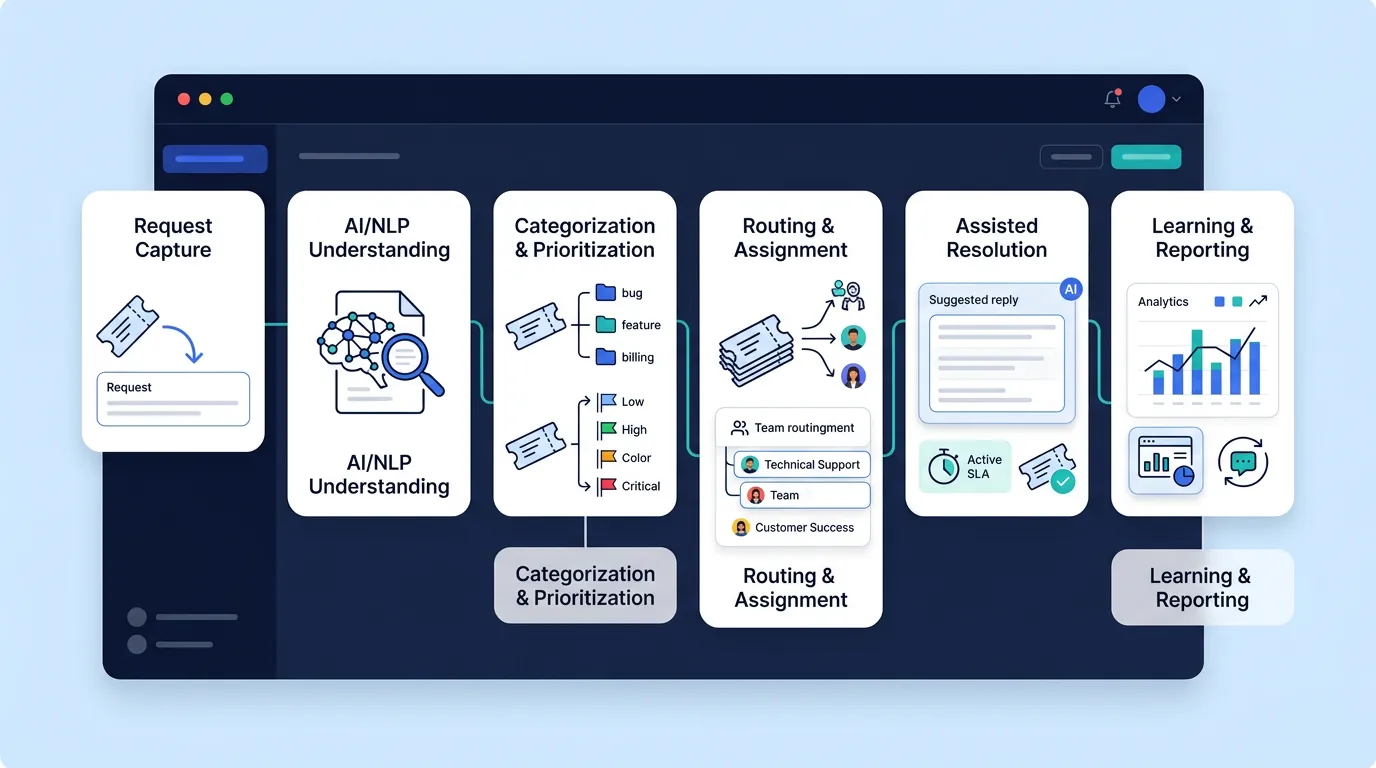
AI ticketing workflow showing request capture, NLP analysis, categorization, prioritization, routing, resolution support, and reporting.
The difference between the two is mostly about who does the sorting. A traditional helpdesk relies on agents to triage and route every ticket by hand.
An AI helpdesk does that triage automatically. The result is faster first responses, fewer misrouted tickets, and more consistent handling across the queue.
A traditional system still works for small, low-volume teams. As volume grows, manual sorting becomes a bottleneck that slows everything down.
The table below summarizes the practical differences. It describes general capabilities, not benchmark figures. Real results depend on your setup, volume, and configuration.
| Aspect | Traditional helpdesk | AI helpdesk |
|---|---|---|
| Triage and routing | Manual, agent-driven | Automatic, based on intent |
| First response speed | Slower at high volume | Faster and more consistent |
| Repetitive questions | Answered one by one | Deflected via self-service |
| Scalability | Tied to headcount | Handles spikes without new hires |
| Reporting | Backward-looking | Predictive and trend-aware |
Triage and routing
First response speed
Repetitive questions
Scalability
Reporting
For a deeper, balanced comparison with examples, see our full breakdown of AI helpdesk vs a traditional helpdesk.
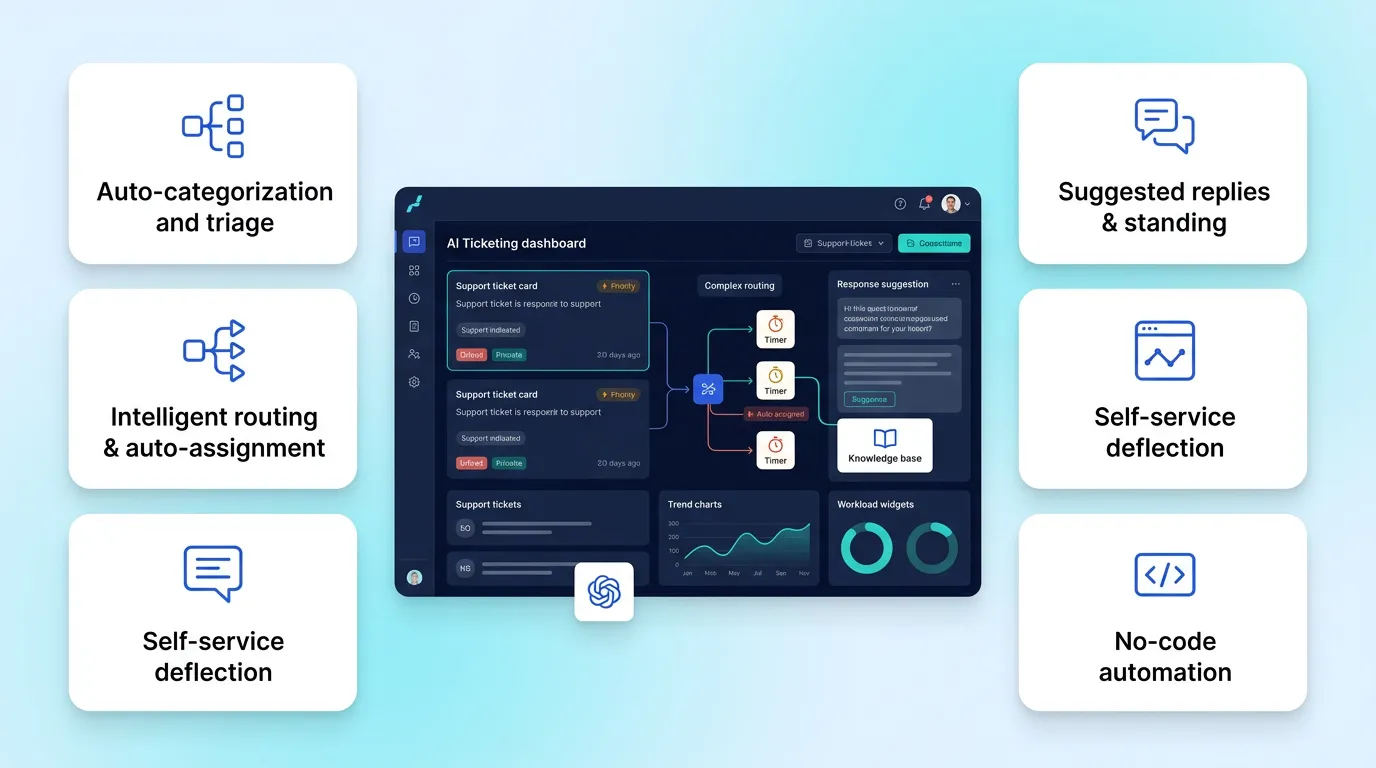
AI ticketing platform dashboard showing auto-triage, smart routing, suggested replies, self-service, analytics, and no-code automation.
Not every tool that claims to be “AI-powered” delivers the same value. A few capabilities matter most when you evaluate options.
The system should read each ticket and tag it by type and urgency without manual input. Good triage is the foundation everything else builds on.
Tickets should reach the right person automatically, by skill, team, or workload. This removes the daily chore of sorting a shared inbox.
An agent copilot can draft responses from past answers and knowledge base content. For simple, repetitive questions, the system can resolve them directly.
A smart knowledge base lets customers solve common issues themselves. Every deflected question is capacity your team gets back.
The system should turn ticket data into insight, not just charts. Strong analytics reveal trends, bottlenecks, and risks before they grow.
Business users should be able to build rules without a developer. Trigger-condition-action logic lets teams automate routing, tagging, and escalation themselves.
Two of these deserve their own deep dives: learn how to set up no-code ticket automation, and how to turn your ticket data into insight with AI ticket analytics and reporting.
The features above add up to a few clear business outcomes. Each one maps to a real cost or risk that support teams face.
Faster response and resolution come first. Automatic triage and routing cut the delay between a request arriving and the right person seeing it.
Lower cost per ticket follows. When self-service and automation handle routine work, the same team supports far more customers.
More consistent quality is another gain. The system applies the same rules to every ticket, so service does not depend on who happens to pick it up.
Finally, better visibility helps managers lead. Real-time dashboards show where pressure is building, so decisions rest on data rather than guesswork.
AI ticketing is not limited to one kind of team. The same engine adapts to several common scenarios.
This is the classic use case. AI triages and routes inbound customer requests, deflects common questions with self-service, and helps agents reply faster.
Internal IT teams use AI ticketing to manage requests like access, hardware, and outages. Automatic prioritization ensures a reported outage jumps ahead of a routine ask.
HR teams handle onboarding, leave, and benefits questions as tickets. Automation routes each request and triggers the right approval steps without manual chasing.
Repair, supply, and workspace requests fit the same model. Routing by location and category gets each issue to the right person quickly.
Because one platform can serve all of these, many companies consolidate customer and internal support by running one helpdesk for IT, HR, and facilities.
AI ticketing is powerful, but it is not magic. Knowing the limits helps you set realistic expectations.
The system depends on data quality. If past tickets were tagged inconsistently, the AI learns those inconsistencies and routes less accurately.
Automation also needs oversight. Auto-replies that miss context can frustrate customers, so a human should review sensitive or complex cases.
Finally, adoption takes change management. Agents need to trust the suggestions and learn the new workflow, which takes a short ramp-up period.
None of these are reasons to avoid AI ticketing. They are reasons to roll it out in stages and keep humans in the loop where judgment matters.
Choosing a tool is easier when you start from your own needs, not a feature list. A short, structured approach keeps the decision grounded.
Implementation works best in stages. Begin with automatic capture and routing, prove the value, then layer on suggested replies and deeper automation.
Train the system with your real data where possible. Machine learning improves as it sees how your team categorizes and resolves tickets.
Hengine SDP is a service management platform built around structured workflows and intelligent analytics. Its ServiceHub engine manages the full ticket lifecycle, from creation and assignment through escalation, closure, and reopening.
Workflow Automation handles the routine work. It can auto-assign tickets by rule, trigger actions on status changes, send notifications, and update priority or routing dynamically.
Its Vital Analytics module adds the intelligent layer. It tracks SLA compliance and ticket trends, and uses AI-driven insights for SLA risk prediction, workload imbalance detection, and trend forecasting.
The result moves a team from reactive support toward proactive, data-driven service. Tickets are captured, routed, and tracked consistently, while managers see risks early enough to act.
You can explore Hengine’s features in full, take a closer look at AI analytics and reporting, and review Hengine pricing to find the right plan.
Next step: See how Hengine automates routing, escalation, and SLA tracking in one platform. Book a demo or start with the free Fremium plan to try it on your own queue.
A few terms come up throughout this topic. This quick reference keeps them clear.
A short scenario shows how the pieces work together. Picture a 30-person software company with one small support team.
A customer emails at 9 a.m. to report that checkout is failing. The system captures the email as a ticket and reads it with NLP.
It detects an outage-related intent and a frustrated tone. The ticket is tagged “billing,” set to P1, and routed straight to the on-call engineer.
At the same time, a second customer asks how to change their password. The system recognizes a common question and offers a self-service article, deflecting the ticket before it reaches an agent.
By mid-morning, the engineer resolves the outage within the four-hour SLA, helped by an at-risk alert that kept it visible. The manager sees both outcomes on the dashboard without chasing anyone.
The lesson is simple. Automation handled the sorting, routing, and deflection, so the team spent its time on the one issue that truly needed a human.
Is an AI ticketing system the same as a chatbot?
No. A chatbot is one possible feature, usually for customer-facing chat. An AI ticketing system is the wider platform that captures, routes, tracks, and reports on requests across every channel.
Will AI ticketing replace support agents?
No. It removes repetitive work like sorting and tagging, but people still handle complex, sensitive, and judgment-heavy cases. The aim is to make agents more effective, not to replace them.
How long does it take to set up?
It varies by tool and scope. Most teams start with automatic capture and routing, which can go live quickly, then add suggested replies and deeper automation in stages.
Does an AI ticketing system work for internal teams too?
Yes. The same engine serves IT, HR, and facilities requests, not just external customers. Each team keeps its own categories and rules inside one platform.



