
A service promise is only as good as your ability to keep it. When deadlines slip without warning, customers lose trust and teams lose credibility.
SLA management is how you set those promises, track them, and hit them consistently. Done well, it turns vague intentions into measurable, reliable service.
This guide covers what SLAs are, how to set realistic targets, and how to track and report on them. Each section links to a deeper article so you can go further on any topic.
A service level agreement, or SLA, is a documented promise about service performance. It usually defines how quickly a team will respond to and resolve a request.
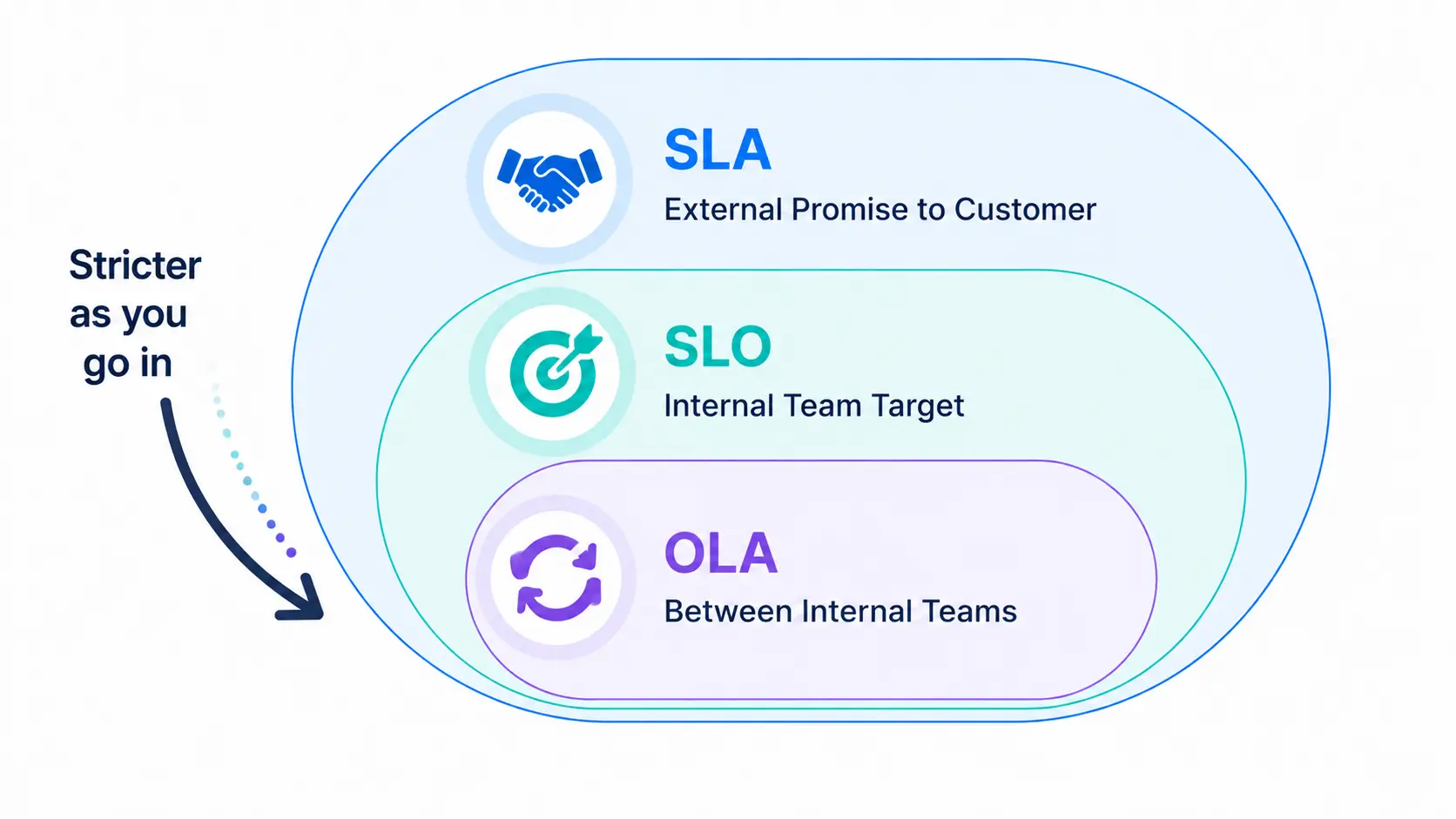
Three related terms often get mixed up, so it helps to separate them.
In short, the SLA faces the customer, the SLO drives the team, and the OLA keeps internal teams aligned. All three work together to deliver reliable service.
SLA management is the ongoing process of defining, tracking, and improving your service level agreements. It covers the full lifecycle, not just the moment an SLA is written.
That lifecycle includes setting targets, monitoring tickets against them, escalating at-risk work, and reporting on results. Each stage feeds the next.
The aim is accountability. Every request carries a clear deadline, and the team has the tools to meet it and the data to prove it.
Without SLA management, service quality drifts. Some tickets get fast attention while others sit forgotten, and no one can say why.
Clear SLAs fix this by making expectations explicit. Customers know what to expect, and agents know which work is most urgent.
SLA management also protects the business. Missed deadlines can mean lost customers, and in contractual settings, financial penalties or service credits.
Finally, it creates a feedback loop. By tracking which SLAs are met and missed, teams find weak spots and improve over time.
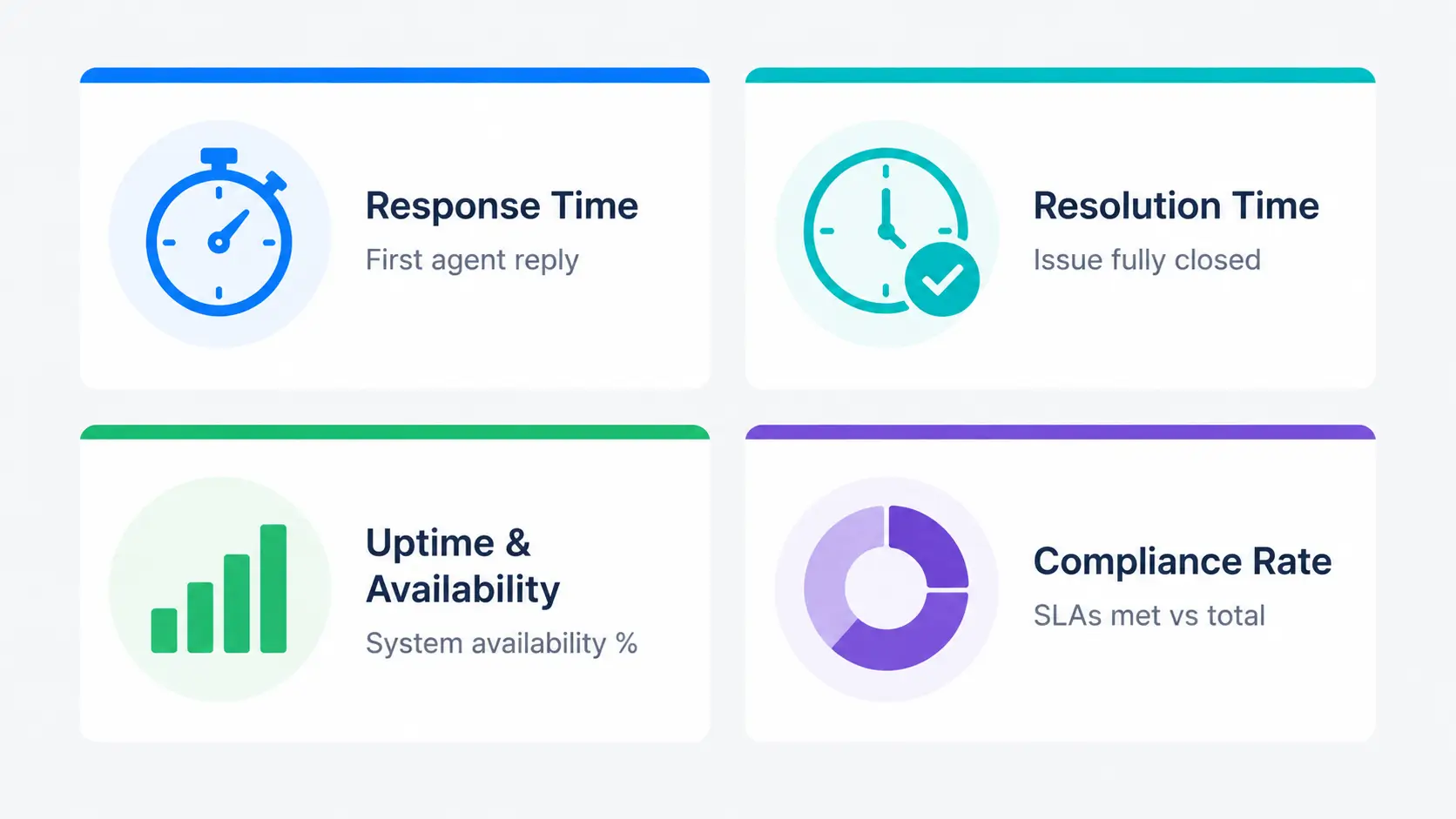
Most SLAs are built from a small set of metrics. Knowing them makes targets easier to set and measure.
This measures how long until an agent first acknowledges the ticket. A fast first response reassures the customer that the request is being handled.
This measures how long until the issue is fully resolved. It is the metric customers care about most, since it reflects the real outcome.
For services and infrastructure, uptime measures how often the system is available. It is usually expressed as a percentage over a period.
This tracks the share of tickets that met their SLA. It is the headline number for reporting on overall performance.
The table below shows how response and resolution targets typically scale by priority.
The timings below are illustrative examples, not benchmarks. Set your own targets from historical data and team capacity.
| Priority | Example response target | Example resolution target | Typical use |
|---|---|---|---|
| P1 – Critical | 15 minutes | 4 hours | Outage or business-stopping issue |
| P2 – High | 1 hour | 8 hours | Major problem affecting many users |
| P3 – Medium | 4 hours | 2 business days | Standard request or minor bug |
| P4 – Low | 1 business day | 5 business days | Cosmetic issue or general question |
Good SLA targets are realistic, not aspirational. The most common mistake is promising speeds the team cannot sustain.
Start with a baseline. Review your historical response and resolution times over a recent period, such as the last 90 days.
Then set targets that improve on the baseline without breaking it. Tie each target to a priority level, so urgent work gets tighter deadlines.
Different departments may need different targets. An IT outage and an HR onboarding request do not move at the same pace, and their SLAs should reflect that.
“How to Set SLA Targets by Priority & Department.”
Setting targets is only half the job. Tracking tells you whether you are actually meeting them, while there is still time to act.
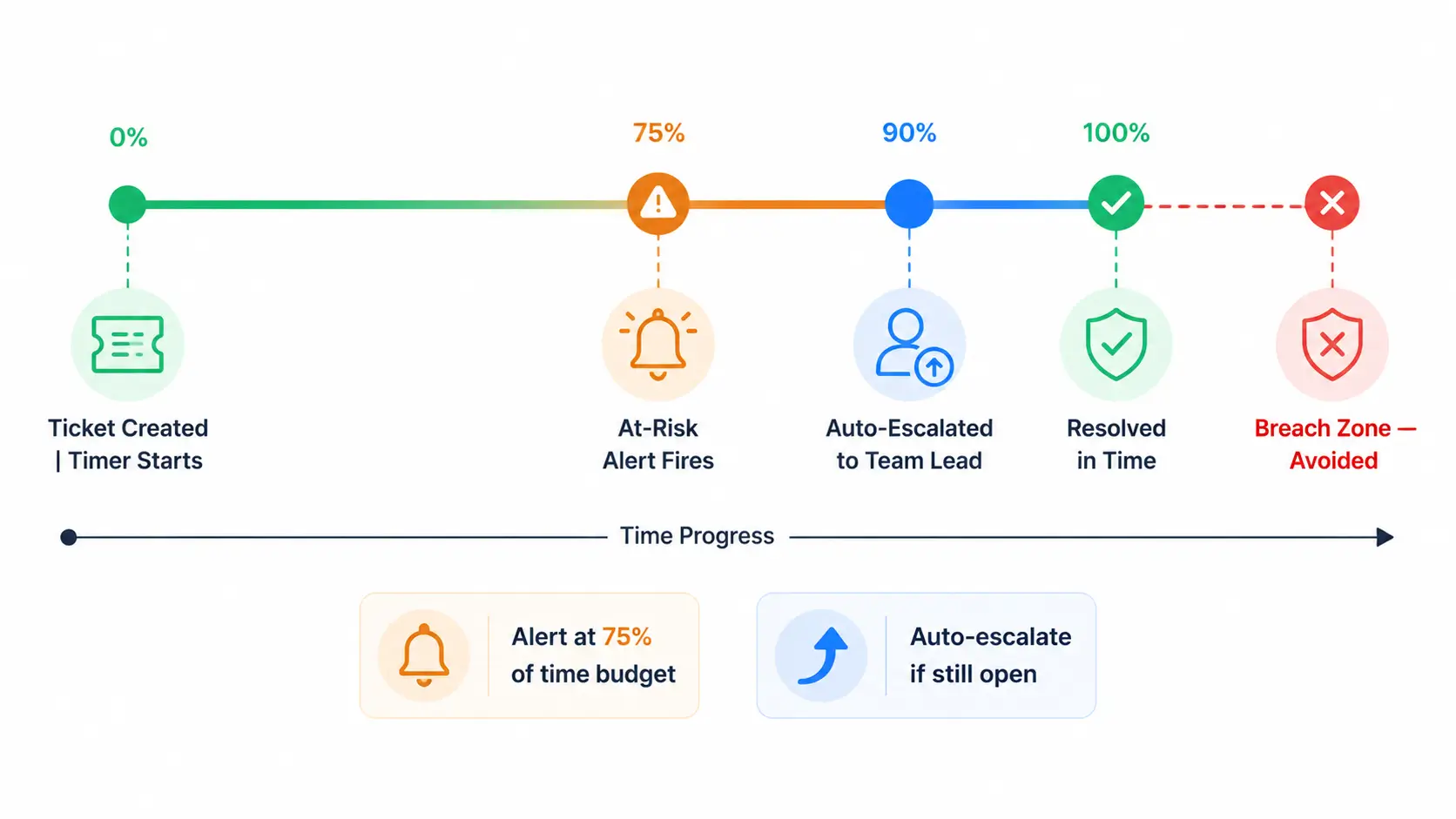
Real-time tracking puts a live timer on every open ticket. Tickets approaching their deadline move into an at-risk state and trigger an alert.
This shifts the team from reactive to proactive. Instead of discovering a breach in next week’s report, a manager sees the risk today and reassigns the work.
Accurate tracking also depends on the clock behaving correctly. Timers should follow business hours and pause when a ticket is waiting on the customer.
“How to Track SLAs in Real Time.”
A breach is a missed SLA deadline. The best SLA management prevents breaches rather than just recording them.
Prevention starts with early warning. An alert at, say, 75 percent of the time budget gives the team a chance to act before the deadline passes.
Escalation rules turn that warning into action. If a ticket is still open near its deadline, it can notify a team lead or reassign automatically.
The strongest rules escalate before a breach, not after. Escalating early keeps the ticket on track instead of just documenting the failure.
“7 Ways to Prevent SLA Breaches” and “Setting SLA Escalation Rules That Work.”
Reporting closes the loop. It shows leadership how well the team is meeting its commitments and where to improve.
A useful SLA report covers a few core numbers. It shows the compliance rate, fulfilled versus missed SLAs, and breaches broken down by priority.
The compliance rate has a simple formula. Divide the number of tickets that met their SLA by the total number of tickets, then express it as a percentage.
Reports work best on a regular cadence. A weekly or monthly review reveals trends, so you can adjust targets that are consistently too tight or too loose.
“SLA Compliance Reporting: A Manager’s Guide.”
In IT service management, SLAs are part of a wider discipline called service level management. It sits within frameworks like ITIL and connects service quality to business goals.
Here the three agreement types work as a chain. The SLA defines the customer promise, the OLA covers supporting internal teams, and underpinning contracts cover external suppliers.
This layered view matters because most services depend on several teams. A four-hour resolution SLA can only hold if the teams behind it have matching internal commitments.
For most support teams, you do not need the full framework to benefit. The core idea is simple: align internal commitments so the customer-facing promise is realistic.
SLA management fails in predictable ways. Spotting these early saves a lot of firefighting later.
The fix for each is the same principle: base SLAs on real data, track them live, and review them regularly.
A few habits separate teams that manage SLAs well from those that constantly firefight.
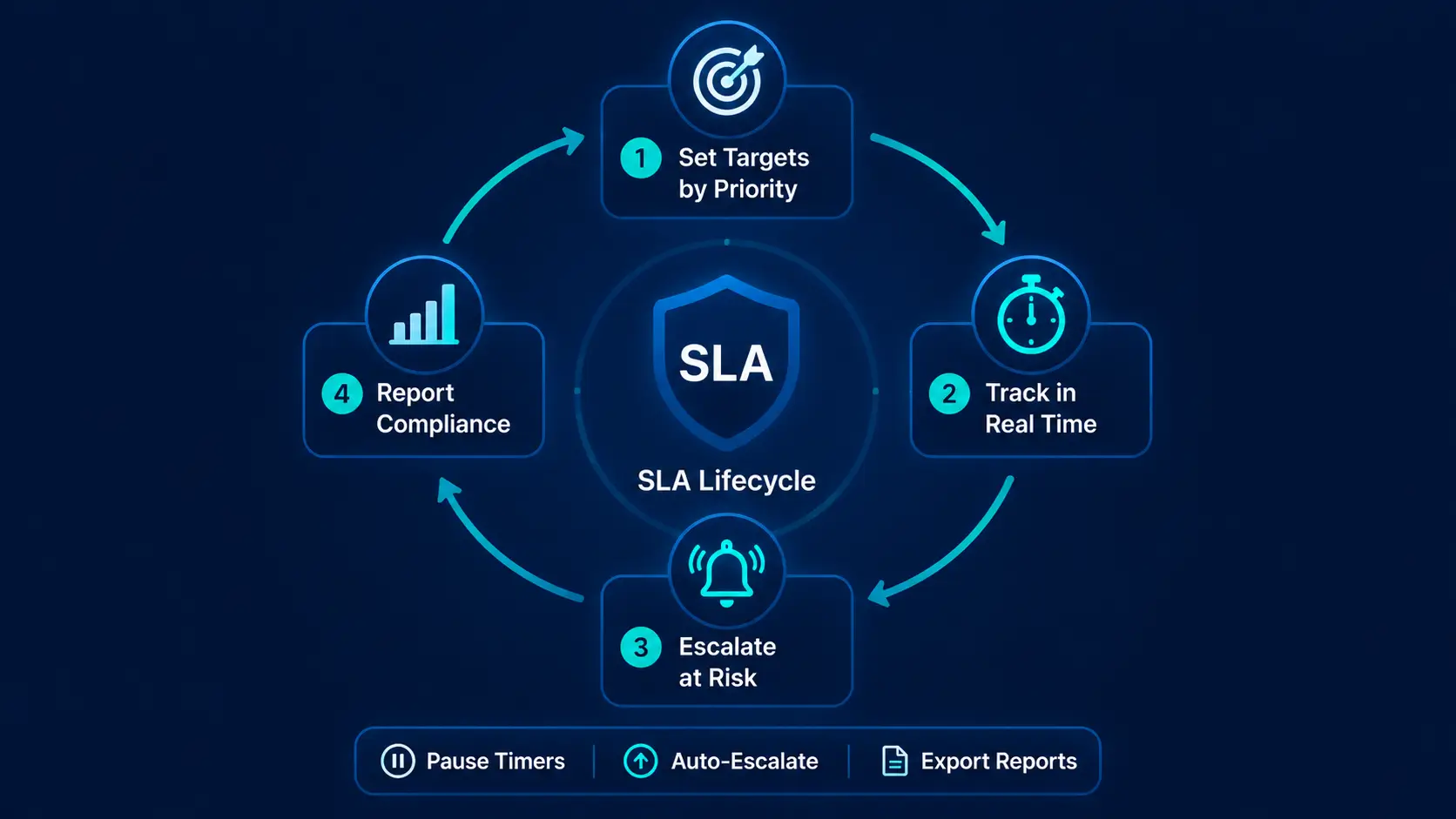
Hengine SDP is built around SLA-driven operations. Its SLA Management and Escalation Engine lets you define response and resolution targets and configure them by priority and department.
Tracking is live. Every open ticket shows its SLA status in real time. The Intelligent Dashboard surfaces SLA compliance, overdue tickets, and average response and resolution times at a glance.
The engine also handles risk and recovery. It pauses and resumes timers for on-hold scenarios, and it escalates automatically when a ticket is about to breach.
For deeper insight, Vital Analytics adds SLA risk prediction, flagging tickets likely to miss before the deadline arrives. Managers can then export SLA compliance reports in PDF or Excel for leadership and audits.
Hengine Real-Time SLA Tracking and Catch SLA Risks Early feature sections, and the Pricing page.
Next step: See how Hengine automates the full SLA lifecycle, from targets to live tracking to reporting. Book a demo or start with the free Freemium plan to try it on your own queue.
A walkthrough makes the lifecycle concrete. Imagine an IT service desk with SLAs set by priority.
At 10 a.m., an employee reports that the shared drive is down for the whole finance team. The ticket is logged and classified as P1, with a 15-minute response and four-hour resolution target.
The response clock starts immediately. A technician acknowledges the ticket within eight minutes, comfortably inside the response SLA.
Diagnosis reveals the fix needs a vendor, so the ticket is placed on hold. The resolution timer pauses, so the wait for the vendor does not count against the team.
At the three-hour mark, an at-risk alert fires because the deadline is approaching. The rule escalates the ticket to a team lead, who pulls in extra help.
The drive is restored within the four-hour window. Afterward, the resolved ticket feeds the compliance report, which shows the SLA was met and confirms the escalation worked.
The takeaway is that good SLA management is a system, not a single setting. Targets, live tracking, pause rules, escalation, and reporting all worked together to protect the deadline.
An SLA is the deadline you promise to a customer. An SLO is the internal target your team aims for, usually a little stricter so you keep a buffer before the SLA is at risk.
It is the percentage of tickets that met their SLA. You calculate it by dividing tickets that met their target by the total number of tickets, over a chosen period.
Use real-time tracking with early at-risk alerts, escalate before the deadline, and set realistic targets from historical data. Prevention depends on acting before the clock runs out, not after.
They are priority levels, from P1 (critical, business-stopping) to P4 (low impact). Each level normally has its own response and resolution targets, with tighter deadlines for higher urgency.
SLA Management sub-articles and to the AI Ticketing analytics article.



