
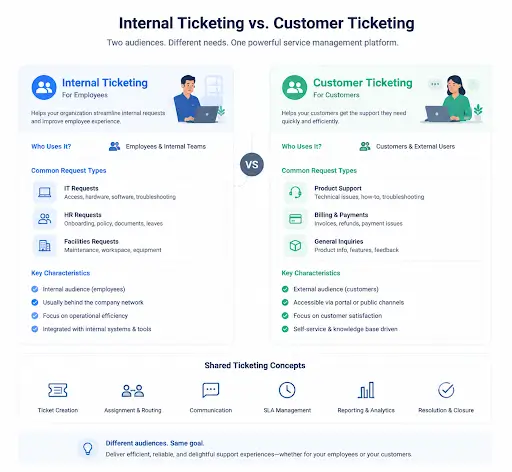
The quick answer: internal ticketing serves your employees, and customer ticketing serves your buyers. Many teams need both, and often one platform can handle them together.
This guide explains the difference, the key things that set them apart, and how to decide what your team needs. It also shows when a single tool can do both jobs.
If you support paying customers, you need customer ticketing. If you handle requests from your own staff, you need internal ticketing.
The two share the same engine but serve different audiences. The table below sums up the core differences before we dig in.
| Factor | Customer ticketing | Internal ticketing |
|---|---|---|
| Who it serves | External customers | Employees |
| Typical requests | Product issues, billing | IT, HR, facilities |
| Tone | Brand-facing | Practical, internal |
| Privacy needs | Customer data | Sensitive HR, finance data |
| Channels | Email, chat, portal | Email, chat, portal, intranet |
Who it serves
Typical requests
Tone
Privacy needs
Channels
Customer ticketing manages requests from the people who buy or use your product. It is the classic support help desk.
These tickets cover questions, complaints, bug reports, and billing issues. Speed and tone matter, because every interaction reflects your brand.
The priority is a fast, helpful, on-brand experience. Customer satisfaction and SLAs are the usual measures of success.

Internal ticketing manages requests from your own employees. It serves teams like IT, HR, and facilities.
Here the “customers” are staff. An employee might ask IT for access, HR about benefits, or facilities for a repair.
The priority is efficiency and a smooth employee experience. Requests should be tracked and resolved without getting lost in email or chat.
Beyond the audience, a few practical differences shape how each is set up.
Customer tickets are brand-facing and need a polished tone. Internal tickets are practical, where clarity matters more than polish.
Internal tickets often carry sensitive HR or finance data. Strong permission controls keep that information visible only to the right people.
Both can arrive by email, chat, or portal. Internal systems may also pull from an intranet or staff directory.
Customer support tracks satisfaction and response times. Internal support focuses on resolution speed and employee experience.

In most cases, yes. The underlying engine for both is the same: capture a request, route it, track it, and resolve it.
A single platform can run customer support and internal IT, HR, and facilities desks side by side. Each team keeps its own categories, forms, and rules.
The shared engine, with a different audience model, is powerful. It means one system, one place to learn, and one view of all support work.
Running both on one tool brings real advantages. They add up quickly for a growing company.
You reduce tool sprawl, since you are not paying for and learning separate systems. Costs and admin both drop.
You also gain a single view of all support work. Leadership can see customer and internal demand together, which helps with staffing and planning.
Finally, your team learns one system. New hires ramp faster when customer and internal support share the same interface.
The decision comes down to who you support. A few questions make it clear.
Do you support paying customers? If so, you need customer ticketing. Do employees send requests to IT, HR, or facilities? If so, you need internal ticketing.
If the answer to both is yes, look for a platform that handles both. Choosing one tool now avoids a painful migration later.
A couple of short scenarios make the difference concrete.
On the customer side, a buyer emails that their order will not check out. The ticket is logged, routed to support, and answered quickly in a friendly, on-brand tone.
On the internal side, a new employee needs a laptop and system access. The request is routed to IT, with an approval step for their manager, and tracked until the equipment is ready.
Both are tickets with an owner, a deadline, and a history. The engine is the same, even though the audience and tone differ.
Hengine SDP is built to serve internal and external requests from one platform. Its ServiceHub engine manages the full ticket lifecycle for any team.
Access and Permissions keep sensitive HR or finance tickets private, while Teams and Workload Management balance work across departments. The same automation and SLA tools apply whether the requester is a customer or an employee.
See also: Best Helpdesk & Ticketing for Startups and One Helpdesk for IT, HR & Facilities.One Platform for Every Request section.
Next step: Run customer and internal support in one place. Start with Hengine’s free Freemium plan or book a demo to see both on a single platform.
Customer ticketing serves external buyers with product and billing support. Internal ticketing serves employees with IT, HR, and facilities requests. The engine is similar, but the audience, tone, and privacy needs differ.
Yes. The same platform can run customer support and internal service desks, with each team keeping its own categories and rules. This reduces cost and gives one view of all support work.
If employees send requests to IT, HR, or facilities, internal ticketing helps. Without it, those requests get lost in email and chat. Many teams add it once internal volume grows.
Internal tickets often contain sensitive HR or finance data, so permission controls are essential. Customer tickets carry customer data, which also needs protection but different access rules.
Internal vs Customer Ticketing” and the AI Ticketing systems.



