

When a ticket is created, other systems often need to know right away. Webhooks are how a help desk tells them, instantly and automatically. They are one of the simplest ways to connect your support tool to the rest of your stack.
This guide explains what webhooks are, how they differ from an API, and how to use them. It is practical, with real examples.
A webhook is an automatic message that a help desk sends when an event happens. When a ticket is created or updated, the help desk sends the details to a web address you choose.
Think of it as a notification for machines. Instead of another system constantly asking “anything new?”, the help desk simply tells it the moment something changes.
That web address, called an endpoint, receives the data and acts on it. The whole exchange happens in real time.
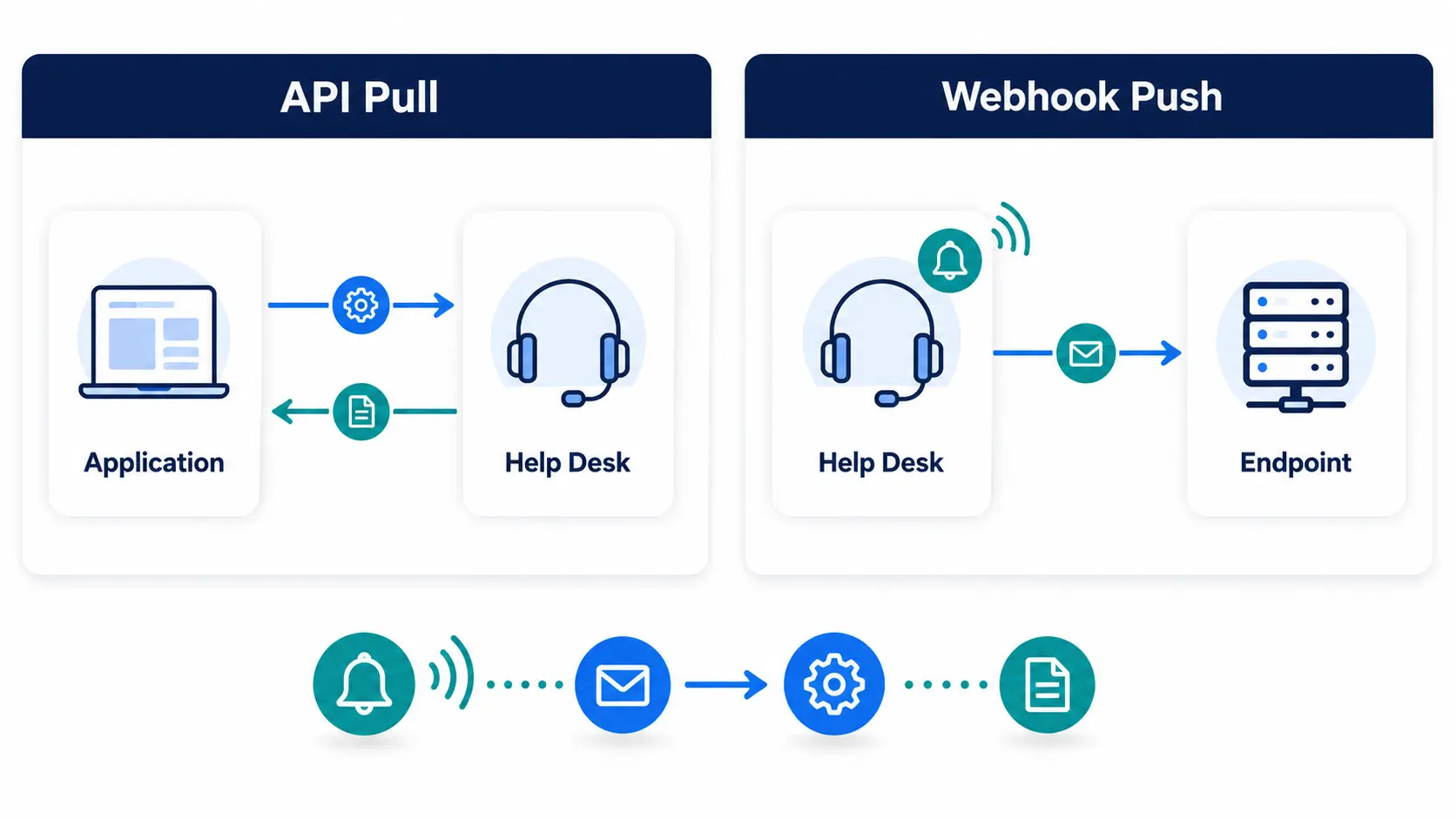
Webhooks and APIs are related but work in opposite directions. Knowing the difference helps you pick the right tool.
An API is something you call. Your system asks the help desk for data or tells it to do something, on demand.
A webhook is the reverse. The help desk calls you, pushing data automatically when an event occurs.
In short, APIs pull and webhooks push. Many integrations use both: a webhook signals an event, then your system calls the API for more detail.
The flow is straightforward once you see it. Here are the stages.
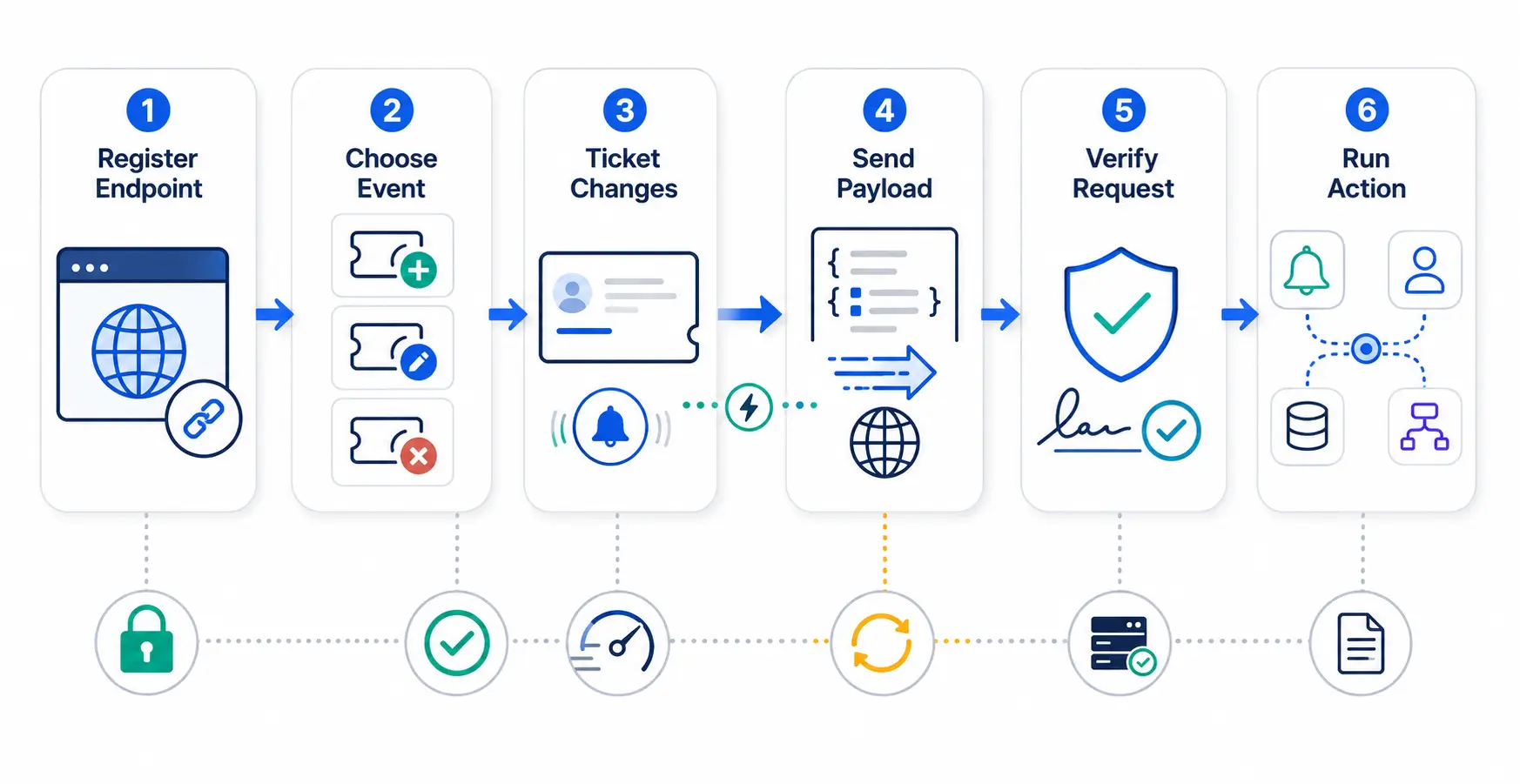
First, you register an endpoint URL in the help desk and choose which events should trigger it. Common triggers are ticket created, updated, or closed.
When one of those events happens, the help desk sends an HTTP request to your endpoint. The request carries a payload, usually the ticket’s data in a structured format.
Your endpoint receives the payload and does something with it. It might post to Slack, update a database, or start a workflow.
Webhooks shine wherever you need an instant reaction to an event. A few examples are common.
Each of these keeps another system in sync the moment something happens, with no manual step.
Setting up a webhook takes a few steps. You will usually need a place to receive the data.
No-code platforms can provide the endpoint for you, so you may not need to write code at all.
Because webhooks send data to a URL, security matters. A few practices keep them safe.
Verify every request using a shared secret or signature, so you know it truly came from your help desk. Ignore anything that fails the check.
For reliability, make your endpoint respond quickly and handle retries. If your system is briefly down, a good help desk will retry delivery so events are not lost.
When a webhook fires, it sends a payload, which is the data about the event. Knowing what is inside helps you use it.
A ticket webhook usually includes the ticket ID, subject, status, priority, and requester. It often carries the event type too, such as “created” or “updated.”
Your endpoint reads these fields and decides what to do. For richer detail, you can use the ID to call the API for the full record.
Keep your handler flexible. Payloads can change over time, so read the fields you need and ignore the rest.
Hengine SDP offers webhooks alongside its API as part of its integration readiness. You can push ticket events to other systems in real time, without polling.
Paired with Workflow Automation, webhooks let a single event ripple across your stack. A new ticket can trigger internal actions in Hengine and notify external tools at the same moment.
This keeps Hengine connected to the rest of your operation. Events flow out instantly, so your other systems always reflect the latest state.
Next step: Push ticket events to your stack in real time with Hengine webhooks. Book a demo or start with the free Fremium plan.
A webhook is an automatic message a system sends when an event happens. For a help desk, it means the tool instantly notifies another system, such as Slack, whenever a ticket is created or updated.
An API is called on demand to pull data or trigger actions. A webhook pushes data automatically when an event occurs. APIs pull, webhooks push, and many integrations use both together.
Sometimes, but not always. No-code platforms can receive a webhook and act on it without programming. You only need code if you build a custom endpoint to handle the data yourself.
They can be, if set up correctly. Use a shared secret or signature to verify each request came from your help desk. Also use HTTPS endpoints so the data is encrypted in transit.



