

Every serious help desk has an API, but many teams never use it. That is a missed opportunity, because an API is what lets your support tool do things the standard interface cannot. It is the key to custom integrations and automation.
This guide explains what a help desk API is, in plain terms, and what you can build with it. No deep technical background is assumed.
An API, or application programming interface, is a way for software to talk to software. A help desk API lets other programs create, read, update, and manage tickets directly.
Think of it as a set of controls exposed to code. Anything an agent can do in the interface, the API can usually do programmatically.
That means developers can connect your help desk to almost any other system. The API is the bridge for custom work.
Native integrations cover common tools, but every business has unique needs. The API fills the gaps.
It lets you build connections no vendor offers, automate multi-step processes, and move data exactly how you want. You are not limited to prebuilt options.
For teams with developers, the API turns the help desk from a fixed product into a flexible platform. It grows with your requirements.
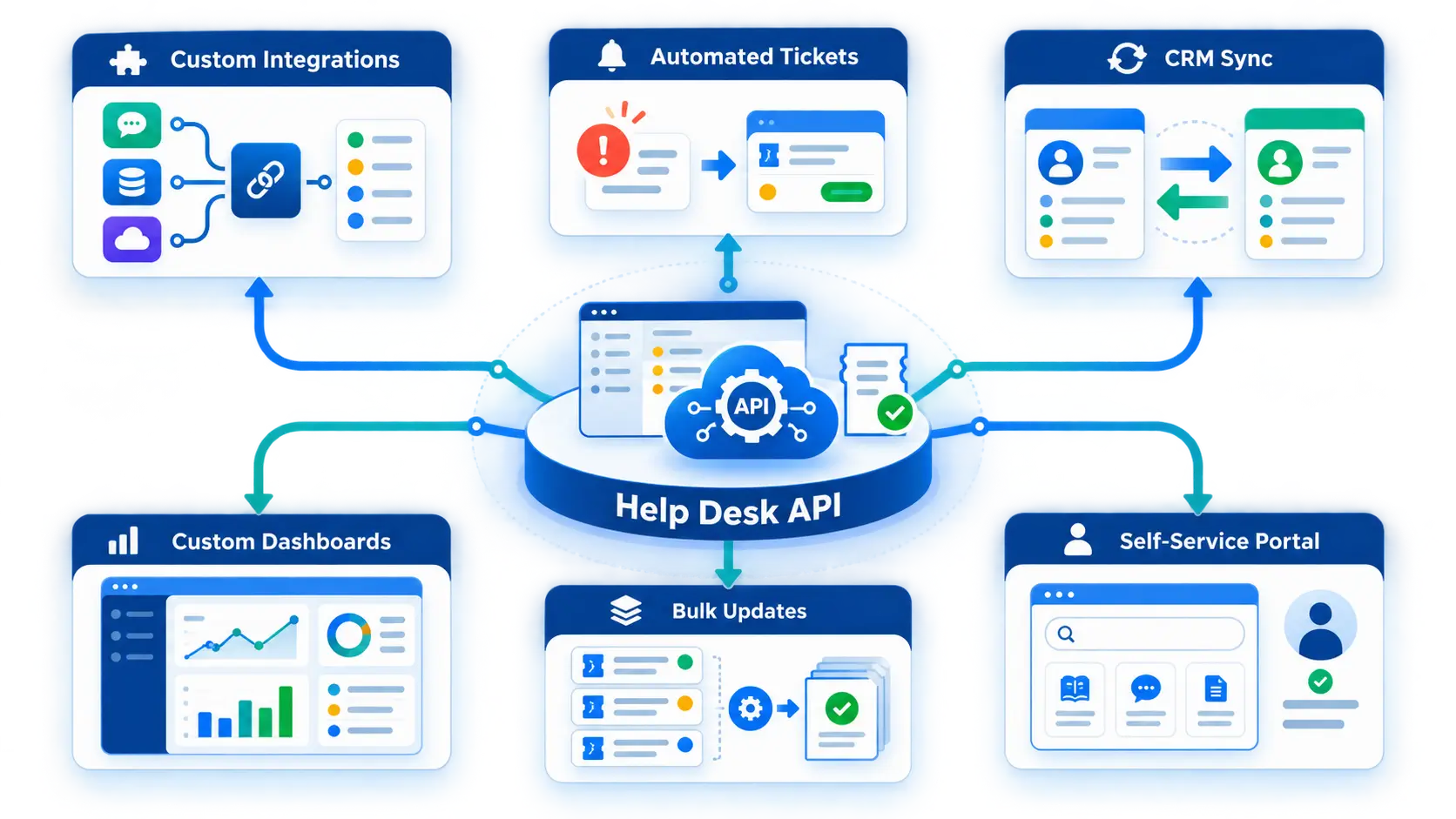
The possibilities are broad. A few examples show the range.
Each of these uses the same core: the API reads and writes ticket data on demand.
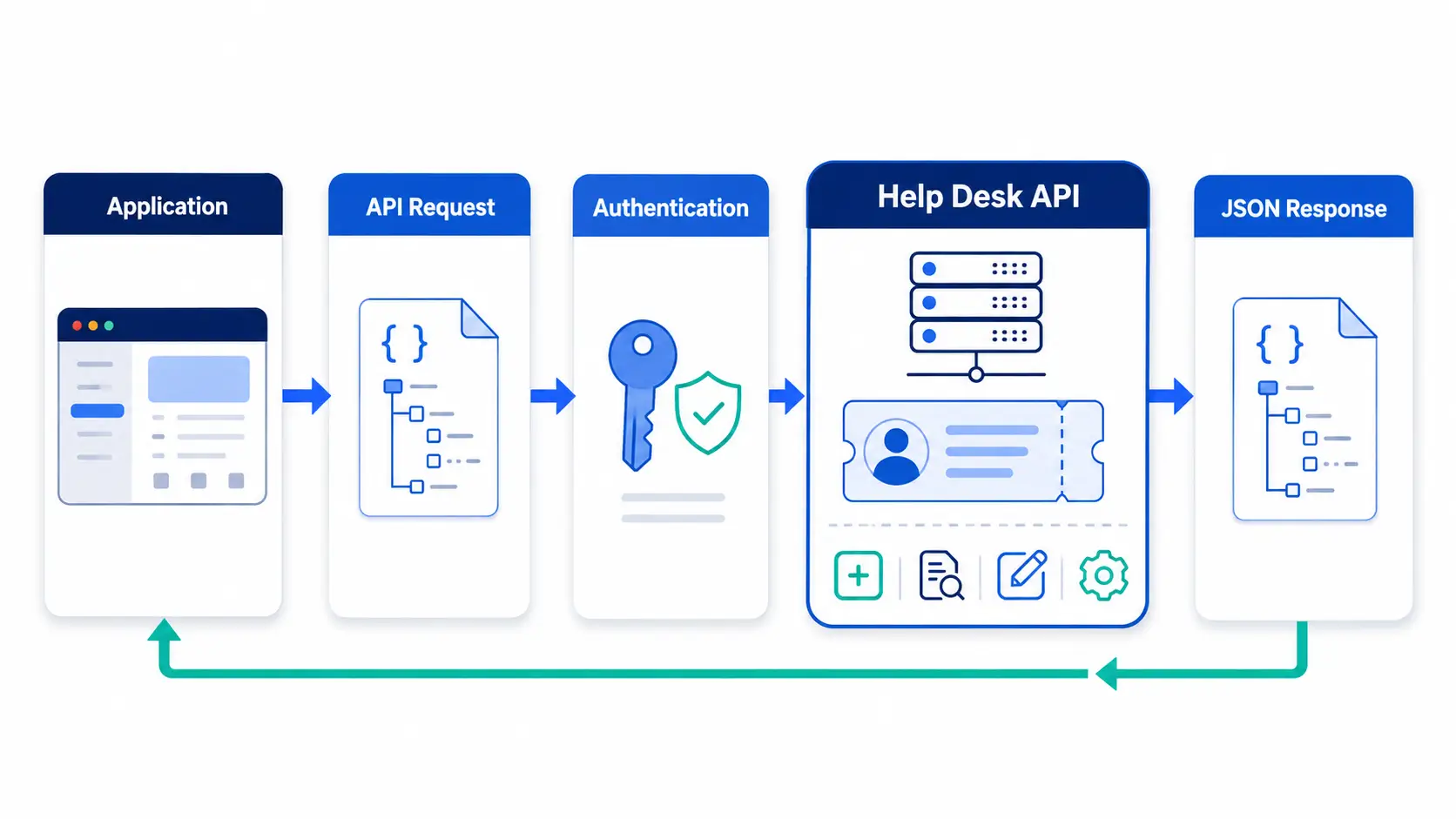
Most modern help desk APIs follow a familiar pattern. Understanding it demystifies the topic.
The API exposes endpoints, which are addresses for specific actions, such as creating a ticket. Your code sends a request to an endpoint.
Each request is authenticated with a token, so only authorized systems can act. The API then performs the action and sends back a response, usually the ticket data.
Data is exchanged in a structured format, typically JSON. This makes it easy for any programming language to work with.
Two concepts matter whenever you use an API. Both protect the system.
Authentication proves who you are. Most APIs use a token or key that you include with every request, rather than a username and password.
Rate limits cap how many requests you can make in a period. They prevent overload, so design your integration to stay within them and handle limit responses gracefully.
You do not need to build everything at once. A staged approach works best.
Starting small lets you learn the API before committing to a large build.
A few errors trip up teams building on an API. They are easy to avoid once known.
The first is ignoring rate limits. Sending too many requests too fast gets your calls blocked, so batch and pace your requests.
The second is poor error handling. Networks fail, so your integration should retry safely and log problems rather than crashing.
The third is hardcoding secrets. Store API tokens securely, never in public code, and rotate them if they are ever exposed.
Hengine SDP is built with API access as part of its integration readiness. Developers can connect Hengine to other systems and work with ticket data programmatically.
This sits alongside webhooks and email-to-ticket, giving teams both push and pull options. Combined with Workflow Automation, the API lets you extend Hengine to fit unique processes.
The aim is a platform that adapts to your stack, not the other way around. Standard needs use native features, while the API handles the custom work.
Next step: Build custom connections on Hengine’s API. Book a demo or start with the free Fremium plan to explore what is possible.
It is a way for other software to control the help desk with code. It can create, read, and update tickets automatically, letting you build custom integrations and automation beyond the standard interface.
Yes, usually. Working with an API directly requires some programming. If you want integrations without code, use native integrations or a no-code platform instead, and save the API for custom needs.
Custom integrations, automated ticket creation, two-way CRM sync, custom dashboards, bulk updates, and self-service portals are common examples. Essentially, anything that involves reading or writing ticket data on your terms.
Rate limits cap how many API requests you can make in a set time. They protect the system from overload. A good integration stays within the limit and handles limit responses without failing.



